
Forums:
Hello all, we survived the transition from the former NARGS Forum software format, to this new web-based forum that is directly integrated with the NARGS.ORG web site. With any transition, there are growing pains, issues to contend with and things to sort out. Please bear with us as we strive to iron out the wrinkles; this topic was created as a clearinghouse of issues and information on the new forum that will help us create a better experience. Please feel free to ask questions and make suggestions. As we discover solutions and our web implementation specialist enables new features, they will be posted here.
Comments
Mark McDonough
Okay, just spent 1/2hr
Thu, 06/27/2013 - 6:36pmOkay, just spent 1/2hr writing a first reply with information on problems uploading messages, did a Preview of my post, okayed it and the message disappeared (vaporized). Lesson learned, don't trust composing messages on forums, or even Facebook, always copy and paste the contents of the message into a text editor *before* attempting to post the message.
Mark McDonough
If you have had problems
Thu, 06/27/2013 - 7:20pmIf you have had problems uploading images to NARGS Forum, please let us know the details. Personally I have had errors, occurring erratically, when trying to upload "embedded images" or "image attachments", sometimes getting an "AJAX HTTP" error message, even though using the same images that work to upload sometimes, but not other times. I know that moderator Lori Skulski has also reported the same issue.
The web developer responded to this report by saying "I can't seem to reproduce this issue. Are forum user still getting this error when uploading images? Does the issue occur in a specific browser and/or version? Does it happen when creating the forum topic or adding a reply or both?".
I primarily use Firefox 9.0.1, not Internet Explorer. I have not created many new forum topics (this is my first on the new new forum), but it has happened many times when attempting to reply to an existing topic.
Any questions or issues on uploading images, please respond here!
Lori S. (not verified)
Hi, Mark,
Thu, 06/27/2013 - 8:40pmHi, Mark,
Re. AJAX HTTP error
I 've had it occur most recently when adding a reply, while using Safari.
Lori S. (not verified)
Two more oddities...
Thu, 06/27/2013 - 9:05pmMore oddities...
1) When one attempts to "copy and paste" from other messages or other sites or to post links, a box appears as shown below:
It says that "because of your browser security settings, the editor is not able to access your clipboard data directly. You are required to paste it agian in this window" . I haven't changed my browser security settings, but now a simple "copy/paste" appears to take multiple (3?) steps.
Do other users have this problem?
2) When the process above is accomplished, the pasted message sometimes comes out in a random font size, which does not match the default font size being used in the forum. I don't see that there is any actual way to change the font size in the reply box. Perhaps I am missing something... ?
Edit: Even stranger... the random font size is visible in the posting box while I am composing the message, but it seems to come out correctly when the message is posted (see below)...???
https://www.nargs.org/forum/terrestrial-orchids?page=11#comment-23217
3) After posting a reply to a thread, I am sometimes basically kicked out of the forum, and have to re-enter the forum form the "Home" screen. This is very inconvenient.
4) The Amazon ad on the right-hand part of the screen is new... which is fine, but I always see it floating inside my Reply box, obscuring any text beneath it (see below):
5) When replying to a thread now, you only see the last reply or the specific one to which you are replying. The previous format, where you could see a page-full of previous replies was vastly better, as you could easily respond to comments made by different people in different threads.
More to follow...
Daniel Dillon
<quote=Mark McD>I primarily
Mon, 07/15/2013 - 7:25am[quote=Mark McD]I primarily use Firefox 9.0.1, not Internet Explorer.[/quote]
Browser version can sometimes be relevant. Firefox 9.01 was released in Dec, 2011. Firefox 22 was released in June, 2013. In addition, Internet Explorer has become known as the 'problem child' of the web browser family. I do check some things in Internet Explorer when developing a web site, but I don't browse the internet with it. I use Firefox mainly, Chrome, and on my Mac, sometimes Safari. On my PC, I use Firefox and Chrome.
Mark McDonough
I should've been more
Mon, 07/15/2013 - 10:03amI should've been more explicit in my browsers used; on my laptop I use Firefox 22 (browser set for auto-updates), it's my work laptop so only use it to view Nargs Forum or other non-work related web sites as a test, it also has the latest Chrome and IE. I have 4 VDI (virtual desktop machines) that I work on, again, each with the three Browsers at latest version. On my older home PC, I maintain Firefox at a version that works with FAFSA, have just one more year of filing on FAFSA (notorious for being browser finicky and incompatible, no matter what their browser specs say).
Richard T. Rodich
I use Firefox 21.0, and I
Fri, 06/28/2013 - 12:15amI use Firefox 21.0, and I haven't had anything not work. But the "oddities" as Lori puts it, abound.
1. I get the EXACT same dialog box that you do, Lori. On top of that, when I try to copy something already typed into the reply box by highlighting as usual, I get this
"Your browswer security settings don't permit the editor to automatically execute copying operations. Please use the keyboard for that(Cntrl/Com+C)."
I never get any ad pop ups anywhere. Firefox adblock plus does a really good job!
2. The individual message texts that accompany when reply is annoying. I'd much rather have the entire thread at my disposal, or nothing at all.
3. And I suppose this is due to my browser incompatibility?
When I open a thread to a new message, the word "new" is in red and superimposed on the message heading, Makes it difficult to read.
4. Firefox use to auto spell check everything I type, everywhere on the web. Now there is a "special" spell check here that I would have to start teaching all over again.
Mark McDonough
Very interesting with
Fri, 06/28/2013 - 6:35amVery interesting with multiple sets of eyes looking at forum issues, more issues are revealed.
With the switch over to the new forum, USERNAMES defaulted back to be using the forumist's names. Per trial and error, we discovered that only Administrators & Moderators can change usernames. I did this for "Ronaldo", changing his USERNAME back to his previous one, "Longma". However, there seems to be a side effect whereby the number of posts under the forumist's avatar is always listed as Posts: 1, not showing his true number of posts, it is stuck at 1. So, two issues:
1. Is there sufficient level of security granularity on the Drupal site, to allow forum users to change their own USERNAME. It's not big deal, if it has to be done by a moderator, perhaps as part of the larger overall security outlook, then fine; just asking the question.
2. If a USERNAME is changed, how to address the side effect mentioned above. I changed my own username to Mark McD, but for me, the number of posts is showing correctly.
Longma (not verified)
I didn't comment on this Mark
Fri, 06/28/2013 - 7:12amI didn't comment on this Mark, because I no longer see the number of posts for anyone! Not a big issue for me however, :)
Richard T. Rodich
I noticed this too, but had
Fri, 06/28/2013 - 8:39amI noticed this too, but hadn't discovered why until you said Mark. I guess we, as moderators, have special consideration, as opposed to guests. I wonder how a NARGS member username change reacts.....
By the way, when I changed my username, it took a day (or at least more than 2 hours) for the username to change in the very top menu bar (Contact,username,renew,log out), although in the forum messages themselves, the change was immediate. .....Just a note, in case it may help with some other bugs in the future.
Ron, what browswer are you using?
Longma (not verified)
RickR wrote:
Fri, 06/28/2013 - 9:10am[quote=RickR]
Ron, what browser are you using?
[/quote]
I'm using Google Chrome.
I haven't experienced any of the other frustrating problems recorded so far. Once I got my head around the structure of this new forum ( I must admit I was seriously daunted when first confronted with it!! ), I find it a real improvement on the old structure. Many of the new features make contributing easier and less time consuming ( auto resizing of pictures, auto layout, good spell check facilities ++ ), and I find the viewing much more focused and cleanly organised, and only having to open one picture per post then being able to enlarge each in turn without going in and out is much smoother. I also think that the picture quality ( a key for a forum ? ) is much improved, for whatever reason. Some of the missing items such as no number of posts, status title of each member etc. are really of no interest to me, and probably are only of interest to administration.
I can even use the English spelling of 'organised' without being constantly corrected ! :)
Daniel Dillon
All users can now change
Mon, 07/15/2013 - 11:39amAll users can now change their username. Previously, just members could.
Daniel Dillon
Just added to the "Fitlered
Tue, 07/16/2013 - 9:09amJust added to the "Fitlered HTML" format in CKEditor (the wywiwyg text editor):
Right-Click Copy is a browser function vs. Ctrl-C is an operating system function. As far as I know (a euphemism for I don't really) Internet Explorer allows both.
The "(Reply to #3)" header text will be moved farther to the right momentarily.
Richard T. Rodich
Oh this just in, regarding
Fri, 06/28/2013 - 9:13amOh this just in, regarding the superimposed "reply" mentioned above: I opened 3 updated thread within seconds of each other in succession - the first and third are not superimposes (for the first time), and the second one is....
Also noticed another change when embedding images: the "browse" now shows the image file name rather than the file location in my pc. I like that.
Longma (not verified)
Fascinating that my posts
Fri, 06/28/2013 - 9:20amFascinating that my posts show as 134 on your picture #2 Rick !!
Margaret Young
I am surprised by Ron's
Fri, 06/28/2013 - 11:33amI am surprised by Ron's comments here, and in another thread, about the automatic resizing of pictures - when I make a post I see a screen which tells me that pix must be below 800 x 800 .....:
And I must admit I am confused by the difference between Embedded images and Image Attachments. - tried both and there didn't seem to be any difference?
Neither do I see how to place the picture within text ...... what am I missing?
I do not find the enlarged screengrabs to be as clear as before, either. Straight photos seem to be okay.
Longma (not verified)
[quote=IMYoung]
Fri, 06/28/2013 - 11:45am[quote=IMYoung]
I am surprised by Ron's comments here, and in another thread, about the automatic resizing of pictures - when I make a post I see a screen which tells me that pix must be below 800 x 800 .....:
[/quote]
I see that 800 x 800 also,............. but if you upload something larger ( certainly in the Image attachments facility) you are informed that your image has been resized automatically to fit within the allowed limits. Brilliant!
Longma (not verified)
Wondering if embedded image
Fri, 06/28/2013 - 11:58amWondering if embedded image means between text, which doesn't work at the moment ( at least for me ) and attached images, i.e. at the end of the text, which do work for me at this time.
Mark McDonough
This is a test, the image is
Fri, 06/28/2013 - 12:01pmThis is a test, the image is 1400 x 1100 pixels, it should resize/constrain the image to max XY dimensions of 800 pixels.
Iris odaesanensis seed harvest 2013
After uploading an embedded image, I place my cursor here in the text window before hitting the Insert button that now displays next to the successfully loaded Embedded image.

Now I can add more text under the image, after the Insert button places the embed image.
Here's a screen capture of the Embedded Image - Insert option after the image uploads.

Cheers
Longma (not verified)
Success with embedding
Fri, 06/28/2013 - 12:10pmSuccess with embedding following your lead Mark ...
Yesss .... it works beautifully. Resizes and embeds automatically.
Margaret Young
Longma wrote:
Fri, 06/28/2013 - 12:20pm[quote=Longma]
I see that 800 x 800 also,............. but if you upload something larger ( certainly in the Image attachments facility) you are informed that your image has been resized automatically to fit within the allowed limits. Brilliant!
[/quote]
That IS good!
Mark : not quite sure I understand about your "place the cursor" comment, and I can't see it now ....... back to the drawing board for me!
Okay, here I go....
A Czech Garden
Margaret Young
Nope, the embedding thing isn
Fri, 06/28/2013 - 12:25pmNope, the embedding thing isn't working for me - but the image attach is... I need more hints, Mark, please
(sigh) Puzzled Maggi
Edit - made another try here- took ages to resize the photo ( could have done it quicker myself) and then it showed on the work page but not in the post.....
In fact the pic is STILL showing on the work page..... I am more confused.... will see if it loads this time....
Longma (not verified)
IMYoung wrote:
Fri, 06/28/2013 - 12:27pm[quote=IMYoung]
A Czech Garden
[/quote]
May I?
1. type your initial text
2. Click on 'choose file' in embedded images
3. After selecting file click on 'upload'
4. After your initial text, choose where you'd like to embed the image and click there ( i.e.. direct in line or after a return )
5. go back to your image and click insert
6 Carry on with successive text.
7. click on save when complete
Any help or just added to confusion??
Margaret Young
That's very clear, Ron, thank
Fri, 06/28/2013 - 12:33pmThat's very clear, Ron, thank you. - it's just not working.........
Aha!!! Yes, thank you, it is.... I found the "insert" box by the pic...... that wasn't clear to me.... thanks! I think I've got it now.....
Maggi
Longma (not verified)
IMYoung wrote:
Fri, 06/28/2013 - 12:44pm[quote=IMYoung]
! I think I've got it now.....
Maggi
[/quote]
I have found that the speed of resizing is possibly dependant on the upload speed of my connection. Sometimes it does it immediately, sometimes it does take longer. However, I still love the idea of ' set it and forget it' ( with due apologies!), as it means the pictures retained in my files dont need to be duplicated / reduced/ renamed etc. Each to their own ways though, :)
Mark McDonough
Glad it's coming together for
Fri, 06/28/2013 - 12:47pmGlad it's coming together for you now Maggi.
Another nuance, figured out why my title text was not showing when mousing over my images, if one edits a message and adds Title text to an image after the fact, newly added title text is ignored. To fix that, highlight the embedded image in the message, delete it, drop your cursor where you want the image, add your Title text, now click Insert, and that version of the embedded image will use the assigned Title text.
Of course, the best habit will be to add Title Text initially when uploading embedded images, and *before* hitting the Insert button to place the image.
Mark McDonough
Similar to what Lori and Rick
Fri, 06/28/2013 - 5:48pmSimilar to what Lori and Rick reported, there's some odd lock-down on copy-&-paste operations. To avoid losing drafted messages in forums and social media if the post fails, I always try to copy the textual portion of the draft before posting, as a backup should the post fail. When I tried tonight, to copy a short paragraph from a message composed on the forum (so I could copy it to Notepad), it gives the following error and prevents the Copy and Paste. This seems to be a bug.
Addenda: after being prevented from copying text in my NARGS Forum message draft, I posted the message, then went back into Edit mode, and then the Copy-&-Paste function is allowed... weird.
Lori S. (not verified)
1. What's the difference
Fri, 06/28/2013 - 8:01pm1. What's the difference between "Active Topics" and "New and Updated Topics"? Seems redundant. (That reminds me that I looked at the forum once earlier today and did not see the "New and Updated Topics" choice, but I see it again now.)
2. The forum used to allow me to start a message, then do a browser search (e.g. look up a plant or a link to add to the message) and return to the message. It doesn't work like that anymore... the connection to the original message is severed, and you return to a blank screen. (I hate websites that do this!)
3. Posting a photo used to be a one step process ("Upload file"); now it seems to be 2 to 3 steps ("Select file/Upload" or "Select file/Upload/Insert"). The simplicity of one step was nice, however, the abilty in the new system to move photos around by dragging and dropping is nice too.
4. Do we really need to know that every photo posted has been "resized to fit within the maximum allowed dimensions of 800x800 pixels" (see example, below). Would it be possible for there to be just a single brief statement that this WILL be done to all photos?
When posting multiple photos, you end up with a long, long string of these messages which takes up a lot of screen room and means a lot of scrolling to get from the dialog box down to the bottom of the page where the photo manipulation takes place.
5. I'm not sure what "My Workbench" and "My Drafts" are meant for, or whether they are different.
I just noticed in "My Workbench" that "My Edits - Five of the most recently updated pieces of content" is inaccurate. Or at least it isn't "THE five most recently updated items", as I'd assume it's meant to show.
6. I don't see how you change the font size or font colour anywhere?
7. A downside of only being able to see the last reply (or the particular posting you are replying to), as opposed to seeing a page-full of past replies in the old system, is that one can't add quotes from different replies. This was handy to be able to do in the old system.
8. Looking back through old threads in Plant Travels and Excursions, it seems that the photos from some of my posts are gone. It seems to happen in the first post in a thread, if it's going to happen (and doesn't happen in every thread).
Mark McDonough
Good points Rick, let me
Sat, 06/29/2013 - 7:33amGood points Lori, let me share and compare thoughts on each of your 8 points.
1. Regarding "Active Topics" and "New and Updated Topics", active topics shows a listing of topics that most recently had replies (thus active). In lieu of having the ability to "subscribe" or "set notification" for topics as we had in the previous NARGS SMF forum, this comes closest. I REALLY MISS the ability to set a topic as "new"; I check the forum and click "New and Updated Topics" which shows those topics you have not actually visited since a new response has come in, then think "I really must respond to that", and I do that for several messages, but previously I could set that those topics "as new" so that I wouldn't miss responding to them later. So, looking through "Active Topics" comes closest, unless Daniel knows of a way to flag a topic "as new".
2. I see what you're saying about browser window back-and-forth continuity, but the workaround that I use, open a second tab, even if to look at a second instance of NARGS Forum; I'm okay with that.
3. Yes, there are more steps uploading/posting photos (sort of), but there's more flexibility here. Doing "inline" or embedded photos previously, one had to write out [attachthumb=1] [attachthumb=2], etc; a manual process. In this forum, upload the image, add Title Text (mouse-over pop-up text), place the cursor, and hit insert... don't like it's placement, highlight-and-delete it, reposition the cursor, hit Insert again; lots of flexibility, I actually like it now that I understand it. The first hour or so working with it, I was rather befuddled by the process... it may be challenging for forumists, we'll have to recreate some How-To docs.
4. So far as the notification about the auto-resizing of images, I'm good with this. It reinforces what the Max image size is. I'm a firm believer of actually resizing images to fit within agreed upon maximum constraints, for best image quality, so will continue to do so rather than allow auto-resizing. However, the fact it will auto-resize images to fit, is awesome, sort of the best of both worlds. The resizing doesn't happen to all images, only those that have an X or Y dimension > 800 pixels.
4a. I agree regarding the long list page size when uploading multiple images, requiring scrolling, the developers of Drupal could have made the interface more concise, but overall I like the flexibility the upload process provides, so scrolling is the small price to pay.
5. "My Workbench" and "My Drafts", I have no idea, I haven't looked at these yet.
6. I'm truly surprised, given this day and age, that there are no controls here to change font size and color!!! Nor change the font itself. Seems almost prehistoric to not have full "rich text" capabilities, these basics have been in web pages and every email editor for the past 15 yrs or more. I don't think most users here will want to fiddle with HTML tags to get some effects. Daniel, can the forum Edit window be allowed to use Rich Text, with selectable font, color and size? And no emoticons! What a joy-kill that is, its these personalizations that can make the forum experience fun, like Skype chat.
7. Seeing only the last message when composing a message, I agree completely, I really liked the old forum where one could see a whole page of previous messages. No I resort to my workaround, open two NARGS Forum browser tabs, one for reference, one for active edit.
8. Missing images in the first post of many topics. Yes, this appears to be a bug in the data migration from the old forum to the new one. Another question for
Daniel: what corrective actions can be taken to find the photos that existing in the old forum, that have been missed by the data import, to get them restored? Similarly, can a scripted "search and replace" be done to fix the hundreds of NARGS Forum urls from the old form, to correct the path to work on the new forum? Or, are the hundreds of broken URLs too different to be automatically fixed, thus stay broken? Please advise.
-------------------------
New one (9.): Lori mentioned this earlier. When I deleted a topic today (it was just a redirection type of message created after I split a topic in the old forum), it throws me out to the root of NARGS.org, not sure why it does that. I was in the "Unanswered" topics view, which I like, a good reminder to taken action on such topics, but deleting a topic there should remain in that view, not throw me out to NARGS home page.
Daniel Dillon
Mark McD wrote:
Sun, 07/21/2013 - 6:34am[quote=Mark McD]
Daniel: what corrective actions can be taken to find the photos that existing in the old forum, that have been missed by the data import, to get them restored? Similarly, can a scripted "search and replace" be done to fix the hundreds of NARGS Forum urls from the old form, to correct the path to work on the new forum? Or, are the hundreds of broken URLs too different to be automatically fixed, thus stay broken? Please advise.
-------------------------
New one (9.): Lori mentioned this earlier. When I deleted a topic today (it was just a redirection type of message created after I split a topic in the old forum), it throws me out to the root of NARGS.org, not sure why it does that. I was in the "Unanswered" topics view, which I like, a good reminder to taken action on such topics, but deleting a topic there should remain in that view, not throw me out to NARGS home page.[/quote]I will look into both of these items.
Richard T. Rodich
Lori S. wrote:
Sat, 06/29/2013 - 10:28pm[quote=Lori S.]
4. Do we really need to know that every photo posted has been "resized to fit within the maximum allowed dimensions of 800x800 pixels" (see example, below). Would it be possible for there to be just a single brief statement that this WILL be done to all photos?
When posting multiple photos, you end up with a long, long string of these messages which takes up a lot of screen room and means a lot of scrolling to get from the dialog box down to the bottom of the page where the photo manipulation takes place.
[/quote]
I find this very anoying also. When posting many photos, having to scroll through a page and more of "your photo was resized" messages each time, to load----place cursor in text where needed----insert.........and for each photo, is not at all effective. If we can't get rid of the multiple resizing messages, can we at least make them not take up so many lines of space?
I really miss the "mark as new" (or "mark as unread" feature, too.
New one (10). I also miss having the ability to go to any page of the thread from both the top of the page and the bottom. (As it is now, it's only available at the bottom.)
I've also noticed that using the arrows in the enlarge photo mode can continue to the next message.
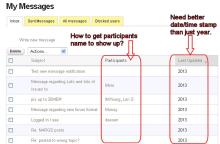
Regarding "Participants" in my Messages list, it seems the only ones listed have (or had) some sort of administrative access: me, Mark, Lori, Todd Boand, Chris K., Peter George, Hugh, McGregor...
Although, since the big change, I haven't had any pm's from "plain" forum members.
Mark McDonough
RickR wrote:
Sun, 06/30/2013 - 4:32am[quote=RickR]
Regarding "Participants" in my Messages list, it seems the only ones listed have (or had) some sort of administrative access: me, Mark, Lori, Todd Boand, Chris K., Peter George, Hugh, McGregor...
Although, since the big change, I haven't had any pm's from "plain" forum members.
[/quote]
In the screen capture of my Inbox, participant names appeared from regular forum users and admins, all messages prior to the forum migration do not list who the message is from, and at the top was a message sent to myself as a text, the participant field is blank.
Mark McDonough
Gene and Lori brought up the
Sun, 06/30/2013 - 5:24amGene and Lori brought up the issue where the "Last Post" listed in "Family, Genus, Species" on the main Forum Home page, does not update properly. This is true, appears to be a bug, and might be related to the fact the "Family, Genus, Species" area is actually a collection of sub-boards, or as they're called on this new forum, sub-forums, and because of this nested structure it gets confused and doesn't show the correct "last topic".
In my test example, I responded to Lori in "Family, Genus, Species" > "2) Astragalus, Oxytropis, Lupinus, and other Fabaceae" board on the Indian Bread-root plant, yet on NARGS Forum Home page, it shows that a post in Terrestrial Orchids was the last post 14 hours prior.
Yet, if you actually go to the "Family, Genus, Species" page, it now shows a listing of all of the categorized boards, and scanning down the list, it does properly show my recent post in "2) Astragalus, Oxytropis, Lupinus, and other Fabaceae". Unless there is a fix, go to the actual "Family, Genus, Species" page to see the status of new or "last posts" for that area.
Mark McDonough
Question for everyone: in
Sun, 06/30/2013 - 5:30amQuestion for everyone: in the old forum, if, while you were composing a message and then went to post it, someone else had posted to the same topic just moments before, the forum would prompt you that you're not responding to the lastest post, asking whether to proceed or not. Did you like that behavior?
Here on the new forum, it just posts without such a check. On the old forum I got burned a number of times where I lost my message because of that pop-up message. I don't have a strong opinion on this one way or the other, but I'm okay with how it works here, what's your opinion?
Longma (not verified)
I found that pop up message
Sun, 06/30/2013 - 7:21amI found that pop up message annoying, and disruptive, so am happy with the fact that it doesn't occur here in the new Forum.
Lori S. (not verified)
Mark, in your "Reply to 31",
Sun, 06/30/2013 - 8:24amMark, in your "Reply to 31", you identified the situtation I was trying to describe! Thanks,
I like the pop-up message about not responding to the last post - seems useful.
Lori S. (not verified)
I seems odd that when I open
Sat, 06/29/2013 - 2:41pmI seems odd that when I open a thread that has more than one photo posted in it, sometimes it is possible to flip through the enlarged photos one by one using the right/left arrow keys, and other times it isn't and the photos have to be enlarged one by one.
Yes, you're right, Mark - the photo posting function is much more versatile now.
Mark McDonough
The enlarged photos have
Sat, 06/29/2013 - 7:05pmThe enlarged photos have worked for me, that is, they display for the user's post, and right/left arrow keys work. The anomalies I've seen, is that the right/left arrows will continue on to other posts (sometimes) ... need to figure out if it happens to other posts from the same user, or randomly just other posts from any user.
Mark McDonough
Feature Fix Request: In the
Sat, 06/29/2013 - 7:43pmFeature Fix Request: In the Private Message view, some messages do not show the "participant" name (the person(s) who sent you the message), and the time stamp is only by year which is sort of ridiculous, needs to be normalized to show regular date format of day-month-year and time.
Lori S. (not verified)
Here's one that I think has
Wed, 07/03/2013 - 7:17pmHere's one that I think has not yet been mentioned.
It is possible to copy a link to a particular thread, e.g. Pulsatilla patens: https://www.nargs.org/forum/pulsatilla-patens
However, it does not seem to be possible to copy the link to a particular message within a thread, e.g. the fourth response in the above thread.
Surely it must be possible to do this somehow? What am I missing?
EDIT: Just noticed something else.. When I composed the message above, and when I view it in Edit mode, the words "particular message" are underlined, as I intended. However, when I view the posted message, there is no underline.
EDIT #2 (by Mark McD): I see what you're saying Lori, the two words are underlined, but not displaying as such. The last part of my note here, should be underlined, hope it works. Hmmm, it seems underlining does not work.
Mark McDonough
Lori S. wrote:
Wed, 07/03/2013 - 7:27pm[quote=Lori S.]
Here's one that I think has not yet been mentioned.
It is possible to copy a link to a particular thread, e.g. Pulsatilla patens: https://www.nargs.org/forum/pulsatilla-patens
However, it does not seem to be possible to copy the link to a particular message within a thread, e.g. the fourth response in the above thread.
Surely it must be possible to do this somehow? What am I missing?
[/quote]
I'm not sure I understand this one Lori. I went to the Pulsatilla patens thread per your link, went down to message #4, went into Edit mode on that message, and pasted the link cited above into it, then saved, and it worked just fine. I went back and deleted my edit to clean up afterwards. Do you get an error message of some sort when attempting to copy and paste a link into a message thread?
Lori S. (not verified)
I'll try to explain... (Sorry
Wed, 07/03/2013 - 7:42pmI'll try to explain... (Sorry, Mark! You know, I really feel for the IT people at work, having to deal with descriptions of computer problems from the computer-illiterate like myself!! ;-) No, no error messages.
In the old forum, when you clicked on a particular message in a thread, the address bar at the top of the computer screen would show an address that included a unique identifer number for that particular posting. Thus, you could go to the 23rd response which was on Page 7 (or wherever) in a long thread and copy the exact address to that response, and post it elsewhere, so that someone could go directly to the 23rd response.
Now, it appears to me that the address bar only shows the general title of the thread, no matter which of the messages within the thread I have clicked on.
EDIT: Okay, I have to correct myself from what I claimed immediately above about the general title... It IS possible to get it down to the PAGE within a long thread, though still not to the iINDIVIDUAL POST. (Capitals for emphasis, since underlining doesn't seem to work!) In the following example, I was trying to post the link to the 3rd message down on Page 9 of this thread, but the closest I can get is starting at the top of Page 9, not to the message itself.
https://www.nargs.org/forum/seed-starting-chronicles-2013?page=9
I hope I've explained it clearly... apologies if not.
Mark McDonough
Lori, have you noticed that
Wed, 07/03/2013 - 8:24pmLori, have you noticed that the message number in the right-hand corner of each post, is a live link. If you click that link, it should show you the URL to that specific link, giving the exact same capability as in the previous form.
I went to the example link you gave:
https://www.nargs.org/forum/seed-starting-chronicles-2013?page=9
...scroll down to a specific message, then click the message # on the right of the message, then copy its URL from the Browser, works for me.
https://www.nargs.org/comment/22186#comment-22186
Lori S. (not verified)
Ah ha! Okay, thank you very
Wed, 07/03/2013 - 8:32pmAh ha! Okay, thank you very much!
EDIT:
Here's a quicker (I think) way to do the same:
Go to the specific post you want a link to. Click on the post number which is on the right hand side of the header area:
The address for that particular message then shows up in the address bar at the top of the screen:
The address bar can then be coped and posted into a message. Viola!
Mark McDonough
I think we said the same
Wed, 07/03/2013 - 9:10pmI think we said the same thing :-)
Lori S. (not verified)
Oops, you're absolutely right
Wed, 07/03/2013 - 9:35pmOops, you're absolutely right! (I thought you were describing something a little different but no. Sorry, I need to read more carefully!)
Richard T. Rodich
I also like the message that
Sun, 06/30/2013 - 8:52amI also like the message that appears if a post has be uploaded since my last refresh. Often, in my replies I need to go out and check something in the garden, verify a name on a tag, etc. that requires a temporary absence from the computer. A considerable amount of time may elapse by the time I return, and it prevents cross posting and messages that seem confusing to readers. If I know a new post has since been posted during my composing, I can refine it to make sense in the natural flow of the thread, rather than posting again, explaining why the first post didn't make a lot of sense.
I've never had that pop up message (or in fact, anything) kick me out of log in status, or nargs.
Lori S. (not verified)
"My Messages" still seems to
Tue, 07/02/2013 - 6:05pm"My Messages" still seems to be acting a bit weird.
I only have 4 messages present in my "Sent Messages" file (out of many dozens that should be there). "All Messages" shows more, but is still missing some. Anyone else seeing this?
Richard T. Rodich
My first real error
Tue, 07/02/2013 - 9:12pmMy first real error experience here. I had posted a message, and it showed it actually went through, but now I can't seem to find it anywhere. I only thought about it when Lori mentioned her Sent box was abbreviated. In fact in my missing message, I had mentioned that my Sent messages box was also vastly incomplete. So here is the missing message again:
-----------------------------------------------------------------------------------------------
This is "interesting"....
I received this email, notifying me that I had a nargs pm........from myself!
Nope. Didn't do that.
I went to my inbox and nothing was there
Nor was there anything in my Sent box. (And I have sent more than four messages over the years, too.)
So I went back to my original email, and used the link given there.
The "new" message was the very first pm I received on the old forum.
Now just prior to this, I had been flipping through my old message pages to see who was listed in the "participant" category. And I did open the last (oldest) page.
But I didn't do anything, I swear!
Richard T. Rodich
The forum search engine works
Wed, 07/03/2013 - 8:10amThe forum search engine works, sort of.
I put the word "participant" (without the quotes) in the search box, and I get results, but this thread we are in now does not come up. Why the format is configured to show the oldest (year 2010) results first, I don't know. But, when I filter for 2013 results, this thread (NARGS forum - Issues, Suggestions, Questions) does not show. These words: participant, participants, "participants" - they are all in the texts of this thread multiple times.
Additionally, the forum search box itself hides the forum thread title, if the title is too long (i.e. this threads title).
Pages